What Your Browser Remembers About You and Why Sites Show You a Different Web
Open a shop you’ve visited before and it often greets you differently. Free shipping instead of a discount. A price that isn’t the one your friend saw. Results ordered around what you clicked last week. None of it is random. Your browser told the site who you are before the page even loaded.
It does this without asking, because that’s what browsers are built to do. Remembering makes the web convenient: you stay logged in, your basket survives, pages load faster. The same memory is what sites use to recognise you.
The memory comes in several kinds, and a site can use any of them.
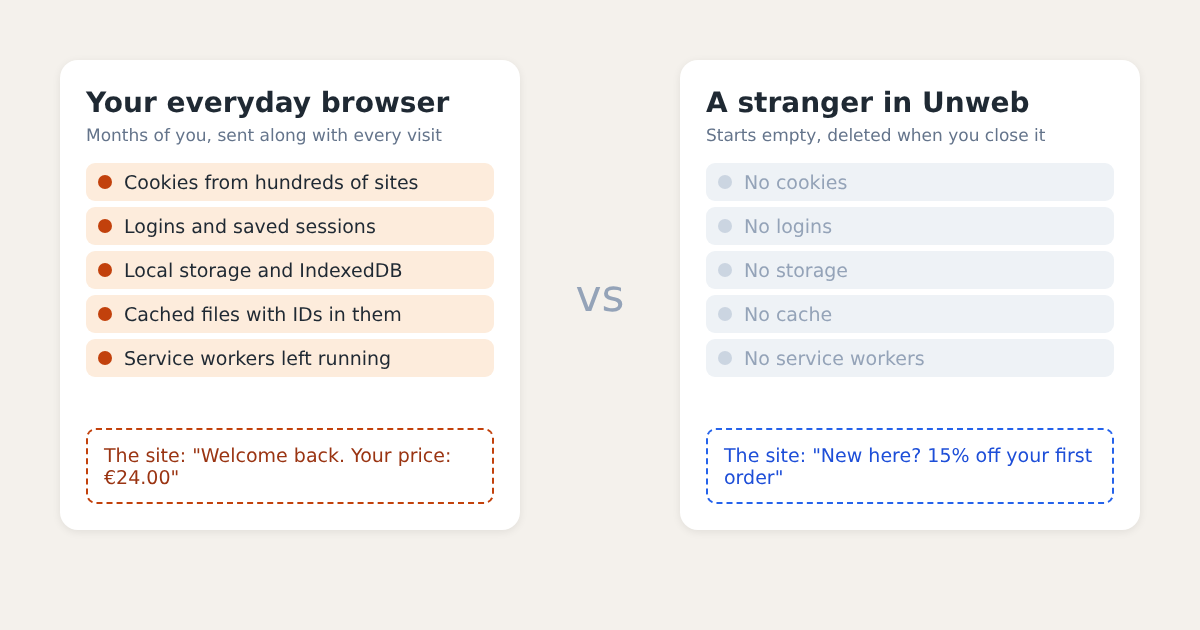
The Places a Browser Keeps You
Cookies are the best known. A site sets a small value, often just a random ID, and your browser sends it back with every request to that site. Cookies set by other sites inside the page, like an ad network or an analytics service, follow you across every site that uses the same service.
Storage is the quieter cousin. Local storage and IndexedDB let a page’s scripts write data to your computer and read it back next visit. Clearing cookies often leaves it in place.
The cache keeps copies of files so pages load faster. A clever site can hide an ID in a cached file, or in the label the browser uses to ask whether its copy is still fresh, and read it back without any cookie at all.
Service workers are small scripts a site installs that keep running in the background, and can answer for the site even when you’re offline.
Logins and history do the rest. A signed-in session tells a site exactly who you are, and your history shapes what search engines and recommendations put in front of you.
Why Private Windows Aren’t the Answer
A private window starts without most of that, which is why it’s the usual advice. But in most browsers every private window you open shares one session. Log in to a site in one and the others are logged in too. Open two to compare and they’re not two visitors, they’re one.
What you actually want to know is often a comparison: what does a newcomer see next to a regular, or a visitor in Germany next to one in France? That needs several clean browsers at once, each kept apart from the others.
A Stranger at a Time
That’s the idea behind Unweb. Every window holds one to four strangers, and each stranger is a browser that has never been anywhere. It has a store of its own that no other stranger can reach, and when you close it, Unweb deletes that store and checks it stays deleted.
A stranger still gives some things away. Sites see your IP address unless you send the stranger through a proxy. And all strangers on one computer share its screen, fonts and graphics card, which is what fingerprinting scripts measure. A clean browser hides what you’ve done, not what you’re using.
But for the question “what does this site show someone it has never met?”, a stranger is the honest answer.