A Shop Sets Seven Cookies Before Anyone Answers Its Cookie Banner
A cookie banner asks “Can we use cookies?” and most people assume nothing happens until they answer. This case study runs on a made-up outdoor shop, Peak Outfitters, built the way plenty of real shops are: the banner is there, and so are the cookies.
The strip above every stranger counts the cookies in its store. A stranger starts with none, so the count is exactly what the site handed over since the page opened.
Open the shop’s product page in Unweb and don’t touch the banner.
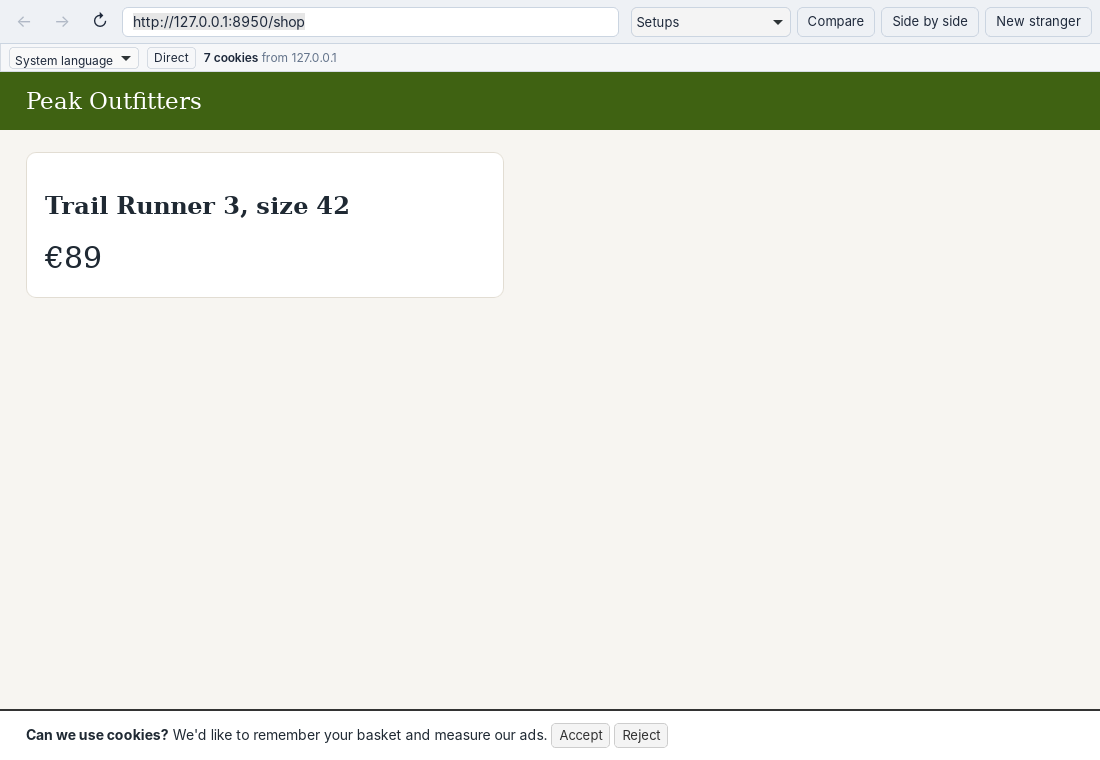
Seven cookies, and the banner is still waiting for an answer.
What It Shows
Seven cookies, before Accept or Reject. Four came from the server with the page: a session ID scripts can’t see, a currency setting and two with the names advertising tools use. Three more were written by the page’s own script, one of them an analytics ID. Unweb counts all of them, including the one hidden from scripts, and reads only their names, never their values.
Some of those may be fine to set without asking: a session or a basket is usually treated as necessary. An analytics or advertising ID usually isn’t. The count is where the question starts, not the answer.
For Site Owners
Open your own pages in a stranger and look at the strip before you click anything. Then click Reject in another stranger and see whether the count goes down, stays, or keeps climbing. Because each stranger starts empty, you’re seeing what a real first-time visitor gets, not what’s left over from your own testing.
The shop is in examples/case-studies; open http://127.0.0.1:8950/shop after starting server.py.