Seeing Both Sides of a Checkout AB Test at Once
A site owner runs a test. Half the visitors get the old checkout, half get a new one with a lower price and a different button. Then someone asks what version B actually looks like on the live site, and nobody on the team can show them, because their browsers were sorted into A weeks ago and the cookie keeps them there.
The usual fixes are a private window, then another, or clearing cookies over and over until the coin lands the other way. Each new try forgets the one before, so you never see the two side by side.
In Unweb, every stranger is a new visitor. Open the checkout page and click Side by side three times. Four new visitors, and the test sorts each one as it arrives.
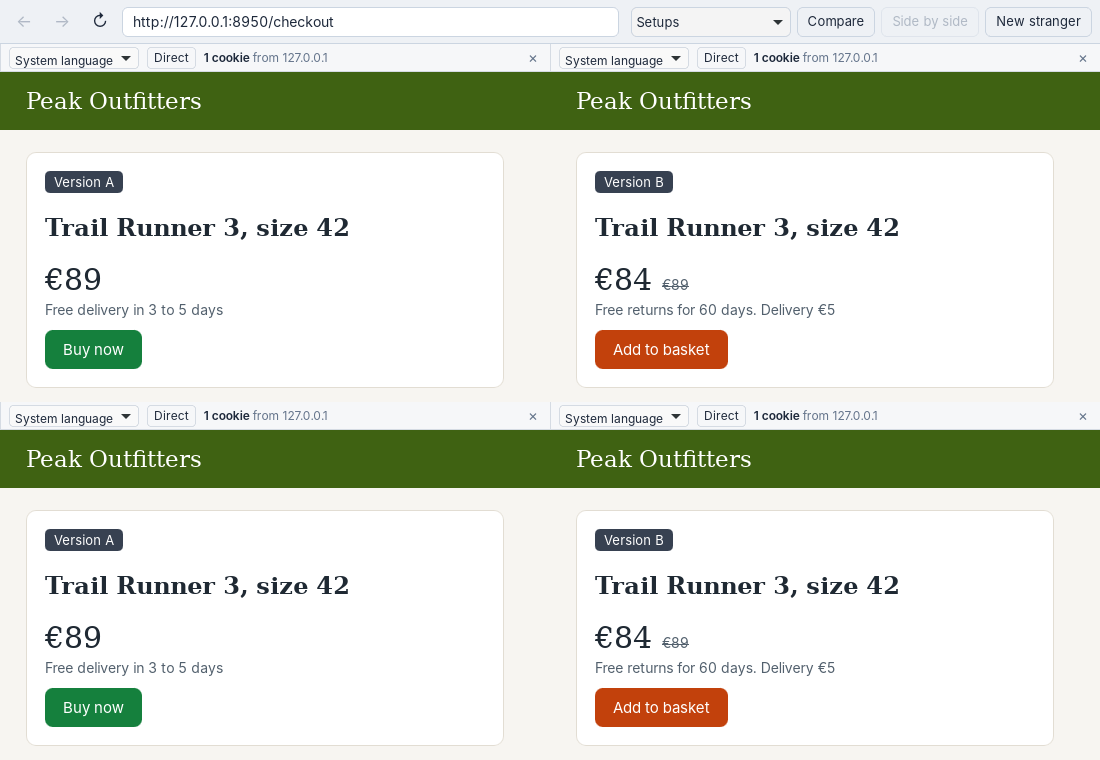
Four strangers, four new visitors, both versions of the test on one screen.
What It Shows
Two A’s and two B’s. Version A keeps the €89 price, free delivery and a green Buy now button. Version B drops the price to €84, charges €5 for delivery, adds free returns and changes the button. Each strip has one cookie from the site, the one that holds the stranger’s version. Close a stranger and its version goes with it; Side by side gives you a fresh draw.
The made-up page hands out versions in turn so the picture is predictable. A real test usually flips a coin, so four strangers may give you three of one and one of the other. Add or replace a stranger until both show up.
Trying It on a Real Site
Point a window of strangers at your own page and save the screen with Compare. That’s a record of both versions as real visitors got them, on the date you took it. It’s also a quick way to check that a test has actually stopped: if every new stranger gets the same version, it has.
Tests that split visitors by country need strangers with a location each. Tests that split by device won’t separate, since all strangers on one computer share it.
The checkout page is in examples/case-studies. Run python3 server.py and open http://127.0.0.1:8950/checkout.